Handling of missing values in python
- kaggle.com
zipUpdated Jul 3, 2022 Share
Share Facebook
 Twitter
 EmailClick to copy linkLink copiedCitexodeum (2022). Handling of missing values in python [Dataset]. https://www.kaggle.com/datasets/xodeum/handling-of-missing-values-in-pythonzip(2634 bytes)Available download formatsDataset updatedJul 3, 2022AuthorsxodeumDescription
In this Datasets i simply showed the handling of missing values in your data with help of python libraries such as NumPy and pandas. You can also see the use of Nan and Non values. Detecting, dropping and filling of null values.
Cleaning Practice with Errors & Missing Values
- kaggle.com
Updated Jun 5, 2025ShareFacebookTwitterEmailClick to copy linkLink copiedCiteZuhair khan (2025). Cleaning Practice with Errors & Missing Values [Dataset]. https://www.kaggle.com/datasets/zuhairkhan13/cleaning-practice-with-errors-and-missing-valuesCroissantCroissant is a format for machine-learning datasets. Learn more about this at mlcommons.org/croissant.Dataset updatedJun 5, 2025AuthorsZuhair khanLicensehttps://creativecommons.org/publicdomain/zero/1.0/https://creativecommons.org/publicdomain/zero/1.0/
DescriptionThis dataset is designed specifically for beginners and intermediate learners to practice data cleaning techniques using Python and Pandas.
It includes 500 rows of simulated employee data with intentional errors such as:
Missing values in Age and Salary
Typos in email addresses (@gamil.com)
Inconsistent city name casing (e.g., lahore, Karachi)
Extra spaces in department names (e.g., " HR ")
✅ Skills You Can Practice:
Detecting and handling missing data
String cleaning and formatting
Removing duplicates
Validating email formats
Standardizing categorical data
You can use this dataset to build your own data cleaning notebook, or use it in interviews, assessments, and tutorials.
CpG Signature Profiling and Heatmap Visualization of SARS-CoV Genomes:...
- figshare.com
txtUpdated Apr 5, 2025ShareFacebookTwitterEmailClick to copy linkLink copiedCiteTahir Bhatti (2025). CpG Signature Profiling and Heatmap Visualization of SARS-CoV Genomes: Tracing the Genomic Divergence From SARS-CoV (2003) to SARS-CoV-2 (2019) [Dataset]. http://doi.org/10.6084/m9.figshare.28736501.v1txtAvailable download formatsUnique identifierhttps://doi.org/10.6084/m9.figshare.28736501.v1Dataset updatedApr 5, 2025AuthorsTahir BhattiLicenseAttribution 4.0 (CC BY 4.0)https://creativecommons.org/licenses/by/4.0/
License information was derived automaticallyDescriptionObjectiveThe primary objective of this study was to analyze CpG dinucleotide dynamics in coronaviruses by comparing Wuhan-Hu-1 with its closest and most distant relatives. Heatmaps were generated to visualize CpG counts and O/E ratios across intergenic regions, providing a clear depiction of conserved and divergent CpG patterns.Methods1. Data CollectionSource : The dataset includes CpG counts and O/E ratios for various coronaviruses, extracted from publicly available genomic sequences.Format : Data was compiled into a CSV file containing columns for intergenic regions, CpG counts, and O/E ratios for each virus.2. PreprocessingData Cleaning :Missing values (NaN), infinite values (inf, -inf), and blank entries were handled using Python's pandas library.Missing values were replaced with column means, and infinite values were capped at a large finite value (1e9).Reshaping :The data was reshaped into matrices for CpG counts and O/E ratios using meltpandas[] and pivot[] functions.3. Distance CalculationEuclidean Distance :Pairwise Euclidean distances were calculated between Wuhan-Hu-1 and other viruses using the scipy.spatial.distance.euclidean function.Distances were computed separately for CpG counts and O/E ratios, and the total distance was derived as the sum of both metrics.4. Identification of Closest and Distant RelativesThe virus with the smallest total distance was identified as the closest relative .The virus with the largest total distance was identified as the most distant relative .5. Heatmap GenerationTools :Heatmaps were generated using Python's seaborn library (sns.heatmap) and matplotlib for visualization.Parameters :Heatmaps were annotated with numerical values for clarity.A color gradient (coolwarm) was used to represent varying CpG counts and O/E ratios.Titles and axis labels were added to describe the comparison between Wuhan-Hu-1 and its relatives.ResultsClosest Relative :The closest relative to Wuhan-Hu-1 was identified based on the smallest Euclidean distance.Heatmaps for CpG counts and O/E ratios show high similarity in specific intergenic regions.Most Distant Relative :The most distant relative was identified based on the largest Euclidean distance.Heatmaps reveal significant differences in CpG dynamics compared to Wuhan-Hu-1 .Tools and LibrariesThe following tools and libraries were used in this analysis:Programming Language :Python 3.13Libraries :pandas: For data manipulation and cleaning.numpy: For numerical operations and handling missing/infinite values.scipy.spatial.distance: For calculating Euclidean distances.seaborn: For generating heatmaps.matplotlib: For additional visualization enhancements.File Formats :Input: CSV files containing CpG counts and O/E ratios.Output: PNG images of heatmaps.Files IncludedCSV File :Contains the raw data of CpG counts and O/E ratios for all viruses.Heatmap Images :Heatmaps for CpG counts and O/E ratios comparing Wuhan-Hu-1 with its closest and most distant relatives.Python Script :Full Python code used for data processing, distance calculation, and heatmap generation.Usage NotesResearchers can use this dataset to further explore the evolutionary dynamics of CpG dinucleotides in coronaviruses.The Python script can be adapted to analyze other viral genomes or datasets.Heatmaps provide a visual summary of CpG dynamics, aiding in hypothesis generation and experimental design.AcknowledgmentsSpecial thanks to the open-source community for developing tools like pandas, numpy, seaborn, and matplotlib.This work was conducted as part of an independent research project in molecular biology and bioinformatics.LicenseThis dataset is shared under the CC BY 4.0 License , allowing others to share and adapt the material as long as proper attribution is given.DOI: 10.6084/m9.figshare.28736501
Medical Clean Dataset
- kaggle.com
zipUpdated Jul 6, 2025ShareFacebookTwitterEmailClick to copy linkLink copiedCiteAamir Shahzad (2025). Medical Clean Dataset [Dataset]. https://www.kaggle.com/datasets/aamir5659/medical-clean-datasetzip(1262 bytes)Available download formatsDataset updatedJul 6, 2025AuthorsAamir ShahzadLicensehttps://creativecommons.org/publicdomain/zero/1.0/https://creativecommons.org/publicdomain/zero/1.0/
DescriptionThis is the cleaned version of a real-world medical dataset that was originally noisy, incomplete, and contained various inconsistencies. The dataset was cleaned through a structured and well-documented data preprocessing pipeline using Python and Pandas. Key steps in the cleaning process included:
- Handling missing values using statistical techniques such as median imputation and mode replacement
- Converting categorical values to consistent formats (e.g., gender formatting, yes/no standardization)
- Removing duplicate entries to ensure data accuracy
- Parsing and standardizing date fields
- Creating new derived features such as age groups
- Detecting and reviewing outliers based on IQR
- Removing irrelevant or redundant columns
The purpose of cleaning this dataset was to prepare it for further exploratory data analysis (EDA), data visualization, and machine learning modeling.
This cleaned dataset is now ready for training predictive models, generating visual insights, or conducting healthcare-related research. It provides a high-quality foundation for anyone interested in medical analytics or data science practice.
Pre-Processed Power Grid Frequency Time Series
- zenodo.org
bin, zipUpdated Jul 15, 2021+ more versionsShareFacebookTwitterEmailClick to copy linkLink copiedCiteJohannes Kruse; Johannes Kruse; Benjamin Schäfer; Benjamin Schäfer; Dirk Witthaut; Dirk Witthaut (2021). Pre-Processed Power Grid Frequency Time Series [Dataset]. http://doi.org/10.5281/zenodo.3744121zip, binAvailable download formatsUnique identifierhttps://doi.org/10.5281/zenodo.3744121Dataset updatedJul 15, 2021AuthorsJohannes Kruse; Johannes Kruse; Benjamin Schäfer; Benjamin Schäfer; Dirk Witthaut; Dirk WitthautDescriptionOverview
This repository contains ready-to-use frequency time series as well as the corresponding pre-processing scripts in python. The data covers three synchronous areas of the European power grid:- Continental Europe
- Great Britain
- Nordic
This work is part of the paper "Predictability of Power Grid Frequency"[1]. Please cite this paper, when using the data and the code. For a detailed documentation of the pre-processing procedure we refer to the supplementary material of the paper.
Data sources
We downloaded the frequency recordings from publically available repositories of three different Transmission System Operators (TSOs).- Continental Europe [2]: We downloaded the data from the German TSO TransnetBW GmbH, which retains the Copyright on the data, but allows to re-publish it upon request [3].
- Great Britain [4]: The download was supported by National Grid ESO Open Data, which belongs to the British TSO National Grid. They publish the frequency recordings under the NGESO Open License [5].
- Nordic [6]: We obtained the data from the Finish TSO Fingrid, which provides the data under the open license CC-BY 4.0 [7].
Content of the repository
A) Scripts
- In the "Download_scripts" folder you will find three scripts to automatically download frequency data from the TSO's websites.
- In "convert_data_format.py" we save the data with corrected timestamp formats. Missing data is marked as NaN (processing step (1) in the supplementary material of [1]).
- In "clean_corrupted_data.py" we load the converted data and identify corrupted recordings. We mark them as NaN and clean some of the resulting data holes (processing step (2) in the supplementary material of [1]).
The python scripts run with Python 3.7 and with the packages found in "requirements.txt".
B) Data_converted and Data_cleansed
The folder "Data_converted" contains the output of "convert_data_format.py" and "Data_cleansed" contains the output of "clean_corrupted_data.py".- File type: The files are zipped csv-files, where each file comprises one year.
- Data format: The files contain two columns. The first one represents the time stamps in the format Year-Month-Day Hour-Minute-Second, which is given as naive local time. The second column contains the frequency values in Hz.
- NaN representation: We mark corrupted and missing data as "NaN" in the csv-files.
Use cases
We point out that this repository can be used in two different was:- Use pre-processed data: You can directly use the converted or the cleansed data. Note however that both data sets include segments of NaN-values due to missing and corrupted recordings. Only a very small part of the NaN-values were eliminated in the cleansed data to not manipulate the data too much. If your application cannot deal with NaNs, you could build upon the following commands to select the longest interval of valid data from the cleansed data:
from helper_functions import * import pandas as pd cleansed_data = pd.read_csv('/Path_to_cleansed_data/data.zip', index_col=0, header=None, squeeze=True, parse_dates=[0]) valid_bounds, valid_sizes = true_intervals(~cleansed_data.isnull()) start,end= valid_bounds[ np.argmax(valid_sizes) ] data_without_nan = cleansed_data.iloc[start:end]- Produce your own cleansed data: Depending on your application, you might want to cleanse the data in a custom way. You can easily add your custom cleansing procedure in "clean_corrupted_data.py" and then produce cleansed data from the raw data in "Data_converted".
License
We release the code in the folder "Scripts" under the MIT license [8]. In the case of Nationalgrid and Fingrid, we further release the pre-processed data in the folder "Data_converted" and "Data_cleansed" under the CC-BY 4.0 license [7]. TransnetBW originally did not publish their data under an open license. We have explicitly received the permission to publish the pre-processed version from TransnetBW. However, we cannot publish our pre-processed version under an open license due to the missing license of the original TransnetBW data.Cars93
- kaggle.com
zipUpdated Sep 16, 2022ShareFacebookTwitterEmailClick to copy linkLink copiedCiteYashpal (2022). Cars93 [Dataset]. https://www.kaggle.com/datasets/yashpaloswal/cars93/discussionzip(4879 bytes)Available download formatsDataset updatedSep 16, 2022AuthorsYashpalLicensehttp://opendatacommons.org/licenses/dbcl/1.0/http://opendatacommons.org/licenses/dbcl/1.0/
DescriptionContent:- The file contains basic cars details
Goal:- You can do multiple things using this dataset such as 1. Missing data treatment 2. Various Pandas operations (to learn; the basic concepts) 3. EDA 4. You can choose to run any machine learning algorithm, considering any features and any label.
The basic purpose of this dataset is to get started in the field of data science and machine learning.
The Device Activity Report with Complete Knowledge (DARCK) for NILM
- zenodo.org
bin, xzUpdated Sep 19, 2025ShareFacebookTwitterEmailClick to copy linkLink copiedCiteAnonymous Anonymous; Anonymous Anonymous (2025). The Device Activity Report with Complete Knowledge (DARCK) for NILM [Dataset]. http://doi.org/10.5281/zenodo.17159850bin, xzAvailable download formatsUnique identifierhttps://doi.org/10.5281/zenodo.17159850Dataset updatedSep 19, 2025AuthorsAnonymous Anonymous; Anonymous AnonymousLicenseAttribution 4.0 (CC BY 4.0)https://creativecommons.org/licenses/by/4.0/
License information was derived automaticallyDescription1. Abstract
This dataset contains aggregated and sub-metered power consumption data from a two-person apartment in Germany. Data was collected from March 5 to September 4, 2025, spanning 6 months. It includes an aggregate reading from a main smart meter and individual readings from 40 smart plugs, smart relays, and smart power meters monitoring various appliances.
2. Dataset Overview
- Apartment: Two-person apartment, approx. 58m², located in Aachen, Germany.
- Aggregate Meter: eBZ DD3
- Sub-meters: 31 Shelly Plus Plug S, 6 Shelly Plus 1PM, 3 Shelly Plus PM Mini Gen3
- Sampling Rate: 1 Hz
- Measured Quantity: Active Power
- Unit of Measurement: Watt
- Duration: 6 months
- Format: Single CSV file (`DARCK.csv`)
- Structure: Timestamped rows with columns for the aggregate meter and each sub-metered appliance.
- Completeness: The main power meter has a completeness of 99.3%. Missing values were linearly interpolated.
3. Download and Usage
The dataset can be downloaded here: https://doi.org/10.5281/zenodo.17159850
As it contains longer off periods with zeros, the CSV file is nicely compressible.
To extract it use:xz -d DARCK.csv.xz.
The compression leads to a 97% smaller file size (From 4GB to 90.9MB).
To use the dataset in python, you can, e.g., load the csv file into a pandas dataframe.pythonimport pandas as pddf = pd.read_csv("DARCK.csv", parse_dates=["time"])4. Measurement Setup
The main meter was monitored using an infrared reading head magnetically attached to the infrared interface of the meter. An ESP8266 flashed with Tasmota decodes the binary datagrams and forwards the Watt readings to the MQTT broker. Individual appliances were monitored using a combination of Shelly Plugs (for outlets), Shelly 1PM (for wired-in devices like ceiling lights), and Shelly PM Mini (for each of the three phases of the oven). All devices reported to a central InfluxDB database via Home Assistant running in docker on a Dell OptiPlex 3020M.
5. File Format (
DARCK.csv)The dataset is provided as a single comma-separated value (CSV) file.
- The first row is a header containing the column names.
- All power values are rounded to the first decimal place.
- There are no missing values in the final dataset.
- Each row represents 1 second, from start of measuring in March until the end in September.
Column Descriptions
Column Name
Data Type
Unit
Description
timedatetime - Timestamp for the reading in YYYY-MM-DD HH:MM:SSmainfloat Watt Total aggregate power consumption for the apartment, measured at the main electrical panel. [appliance_name]float Watt Power consumption of an individual appliance (e.g., lightbathroom,fridge,sherlockpc). See Section 8 for a full list.Aggregate Columns aggr_chargersfloat Watt The sum of sherlockcharger,sherlocklaptop,watsoncharger,watsonlaptop,watsonipadcharger,kitchencharger.aggr_stoveplatesfloat Watt The sum of stoveplatel1andstoveplatel2.aggr_lightsfloat Watt The sum of lightbathroom,lighthallway,lightsherlock,lightkitchen,lightlivingroom,lightwatson,lightstoreroom,fcob,sherlockalarmclocklight,sherlockfloorlamphue,sherlockledstrip,livingfloorlamphue,sherlockglobe,watsonfloorlamp,watsondesklampandwatsonledmap.Analysis Columns inaccuracyfloat Watt As no electrical device bypasses a power meter, the true inaccuracy can be assessed. It is the absolute error between the sum of individual measurements and the mains reading. A 30W offset is applied to the sum since the measurement devices themselves draw power which is otherwise unaccounted for. 6. Data Postprocessing Pipeline
The final dataset was generated from two raw data sources (
meter.csvandshellies.csv) using a comprehensive postprocessing pipeline.6.1. Main Meter (
main) PostprocessingThe aggregate power data required several cleaning steps to ensure accuracy.
- Outlier Removal: Readings below 10W or above 10,000W were removed (merely 3 occurrences).
- Timestamp Burst Correction: The source data contained bursts of delayed readings. A custom algorithm was used to identify these bursts (large time gap followed by rapid readings) and back-fill the timestamps to create an evenly spaced time series.
- Alignment & Interpolation: The smart meter pushes a new value via infrared every second. To align those to the whole seconds, it was resampled to a 1-second frequency by taking the mean of all readings within each second (in 99.5% only 1 value). Any resulting gaps (0.7% outage ratio) were filled using linear interpolation.
6.2. Sub-metered Devices (
shellies) PostprocessingThe Shelly devices are not prone to the same burst issue as the ESP8266 is. They push a new reading at every change in power drawn. If no power change is observed or the one observed is too small (less than a few Watt), the reading is pushed once a minute, together with a heartbeat. When a device turns on or off, intermediate power values are published, which leads to sub-second values that need to be handled.
- Grouping: Data was grouped by the unique device identifier.
- Resampling & Filling: The data for each device was resampled to a 1-second frequency using
.resample('1s').last().ffill().
This method was chosen to firstly, capture the last known state of the device within each second, handling rapid on/off events. Secondly, to forward-fill the last state across periods of no new data, modeling that the device's consumption remained constant until a new reading was sent.
6.3. Merging and Finalization
- Merge: The cleaned main meter and all sub-metered device dataframes were merged into a single dataframe on the
timeindex. - Final Fill: Any remaining
NaNvalues (e.g., from before a device was installed) were filled with0.0, assuming zero consumption.
7. Manual Corrections and Known Data Issues
During analysis, two significant unmetered load events were identified and manually corrected to improve the accuracy of the aggregate reading. The error column (
inaccuracy) was recalculated after these corrections.- March 10th - Unmetered Bulb: An unmetered 107W bulb was active. It was subtracted from the main reading as if it never happened.
- May 31st - Unmetered Air Pump: An unmetered 101W pump for an air mattress was used directly in an outlet with no intermediary plug and hence manually added to the respective plug.
8. Appliance Details and Multipurpose Plugs
The following table lists the column names with an explanation where needed. As Watson moved at the beginning of June, some metering plugs changed their appliance.
Netflix Data Analysis
- kaggle.com
Updated Oct 15, 2024ShareFacebookTwitterEmailClick to copy linkLink copiedCiteAnkul Sharma (2024). Netflix Data Analysis [Dataset]. https://www.kaggle.com/datasets/ankulsharma150/netflix-data-analysisCroissantCroissant is a format for machine-learning datasets. Learn more about this at mlcommons.org/croissant.Dataset updatedOct 15, 2024AuthorsAnkul SharmaDescriptionIntroduction
This datasets about Netflix Movies & TV Shows. Datasets have 12 columns with some null values. To analysis of dataset are used Pandas, plotly.express and Datetime libraries. Analysis process I divided into several parts for step wise analysis and to find out trending questions on social media for Bollywood actors and actress.
Data Manipulation
Missing Data
There are many representations of missing data. They are Null values, missing values. I used some of methods used in data analysis process to clean missing values.
Data Munging
String Method
There I used some string method on column such as 'cast', 'Lested_in' to extract data
Datetime data type
Converting an object type into datatype objects with the to_datetime function then we have a datatime object, can extract various part of data such as year, month and day
EDA
Here, I find out several eye catching question. the following questions are like as- - Show the all Movies & TV Shows released by month - Count the all types of unique rating & which rating are with most number - Salman, Shah Rukh and Akshay Kumar all movie - Find out the Movies & Series have Maximum time length - Year on Year show added on Netflix by its type - Akshay Kumar all comedies movies, Shah Rukh movies with Kajol and Salman-Akshay Movies - Who Director has made the most TV Shows - Actors and Actress who have given most Number of Movies - Find out which types of genre has most movies and TV Shows
- n
Extirpated species in Berlin, dates of last detections, habitats, and number...
- data.niaid.nih.gov
- datadryad.org
zipUpdated Jul 9, 2024+ more versionsShareFacebookTwitterEmailClick to copy linkLink copiedCiteSilvia Keinath (2024). Extirpated species in Berlin, dates of last detections, habitats, and number of Berlin’s inhabitants [Dataset]. http://doi.org/10.5061/dryad.n5tb2rc4kzipAvailable download formatsUnique identifierhttps://doi.org/10.5061/dryad.n5tb2rc4kDataset updatedJul 9, 2024Dataset provided byMuseum für NaturkundeAuthorsSilvia KeinathLicensehttps://spdx.org/licenses/CC0-1.0.htmlhttps://spdx.org/licenses/CC0-1.0.html
Area coveredBerlinDescriptionSpecies loss is highly scale-dependent, following the species-area relationship. We analysed spatio-temporal patterns of species’ extirpation on a multitaxonomic level using Berlin, the capital city of Germany. Berlin is one of the largest cities in Europe and has experienced a strong urbanisation trend since the late 19th century. We expected species’ extirpation to be exceptionally high due to the long history of urbanisation. Analysing regional Red Lists of Threatened Plants, Animals, and Fungi of Berlin (covering 9498 species), we found that 16 % of species were extirpated, a rate 5.9 times higher than at the German scale, and 47.1 times higher than at the European scale. Species’ extirpation in Berlin is comparable to that of another German city with a similarly broad taxonomic coverage, but much higher than in regional areas with less human impact. The documentation of species’ extirpation started in the 18th century and is well documented for the 19th and 20th centuries. We found an average annual extirpation of 3.6 species in the 19th century, 9.6 species in the 20th century, and the same number of extirpated species as in the 19th century were documented in the 21th century, despite the much shorter time period. Our results showed that species’ extirpation is higher at small than on large spatial scales, and might be negatively influenced by urbanisation, with different effects on different taxonomic groups and habitats. Over time, we found that species’ extirpation is highest during periods of high human alterations and is negatively affected by the number of people living in the city. But, there is still a lack of data to decouple the size of the area and the human impact of urbanisation. However, cities might be suitable systems for studying species’ extirpation processes due to their small scale and human impact. Methods Data extraction: To determine the proportion of extirpated species for Germany, we manually summarised the numbers of species classified in category 0 ‘extinct or extirpated’ and calculated the percentage in relation to the total number of species listed in the Red Lists of Threatened Species for Germany, taken from the website of the Red List Centre of Germany (Rote Liste Zentrum, 2024a). For Berlin, we used the 37 current Red Lists of Threatened Plants, Animals, and Fungi from the city-state of Berlin, covering the years from 2004 to 2023, taken from the official capital city portal of the Berlin Senate Department for Mobility, Transport, Climate Protection and Environment (SenMVKU, 2024a; see overview of Berlin Red Lists used in Table 1). We extracted all species that are listed as extinct/extirpated, i.e. classified in category 0, and additionally, if available, the date of the last record of the species in Berlin. The Red List of macrofungi of the order Boletales by Schmidt (2017) was not included in our study, as this Red List has only been compiled once in the frame of a pilot project and therefore lacks the category 0 ‘extinct or extirpated’. We used Python, version 3.7.9 (Van Rossum and Drake, 2009), the Python libraries Pandas (McKinney et al., 2010), and Camelot-py, version 0.11.0 (Vinayak Meta, 2023) in Jupyter Lab, version 4.0.6 (Project Jupyter, 2016) notebooks. In the first step, we created a metadata table of the Red Lists of Berlin to keep track of the extraction process, maintain the source reference links, and store summarised data from each Red List pdf file. At the extraction of each file, a data row was added to the metadata table which was updated throughout the rest of the process. In the second step, we identified the page range for extraction for each extracted Red List file. The extraction mechanism for each Red List file depended on the printed table layout. We extracted tables with lined rows with the Lattice parsing method (Camelot-py, 2024a), and tables with alternating-coloured rows with the Stream method (Camelot-py, 2024b). For proofing the consistency of extraction, we used the Camelot-py accuracy report along with the Pandas data frame shape property (Pandas, 2024). After initial data cleaning for consistent column counts and missing data, we filtered the data for species in category 0 only. We collated data frames together and exported them as a CSV file. In a further step, we proofread whether the filtered data was tallied with the summary tables, given in each Red List. Finally, we cleaned each Red List table to contain the species, the current hazard level (category 0), the date of the species’ last detection in Berlin, and the reference (codes and data available at: Github, 2023). When no date of last detection was given for a species, we contacted the authors of the respective Red Lists and/or used former Red Lists to find information on species’ last detections (Burger et al., 1998; Saure et al., 1998; 1999; Braasch et al., 2000; Saure, 2000). Determination of the recording time windows of the Berlin Red Lists We determined the time windows, the Berlin Red Lists look back on, from their methodologies. If the information was missing in the current Red Lists, we consulted the previous version (see all detailed time windows of the earliest assessments with references in Table B2 in Appendix B). Data classification: For the analyses of the percentage of species in the different hazard levels, we used the German Red List categories as described in detail by Saure and Schwarz (2005) and Ludwig et al. (2009). These are: Prewarning list, endangered (category 3), highly endangered (category 2), threatened by extinction or extirpation (category 1), and extinct or extirpated (category 0). To determine the number of indigenous unthreatened species in each Red List, we subtracted the number of species in the five categories and the number of non-indigenous species (neobiota) from the total number of species in each Red List. For further analyses, we pooled the taxonomic groups of the 37 Red Lists into more broadly defined taxonomic groups: Plants, lichens, fungi, algae, mammals, birds, amphibians, reptiles, fish and lampreys, molluscs, and arthropods (see categorisation in Table 1). We categorised slime fungi (Myxomycetes including Ceratiomyxomycetes) as ‘fungi’, even though they are more closely related to animals because slime fungi are traditionally studied by mycologists (Schmidt and Täglich, 2023). We classified ‘lichens’ in a separate category, rather than in ‘fungi’, as they are a symbiotic community of fungi and algae (Krause et al., 2017). For analyses of the percentage of extirpated species of each pooled taxonomic group, we set the number of extirpated species in relation to the sum of the number of unthreatened species, species in the prewarning list, and species in the categories one to three. We further categorised the extirpated species according to the habitats in which they occurred. We therefore categorised terrestrial species as ‘terrestrial’ and aquatic species as ‘aquatic’. Amphibians and dragonflies have life stages in both, terrestrial and aquatic habitats, and were categorised as ‘terrestrial/aquatic’. We also categorised plants and mosses as ‘terrestrial/aquatic’ if they depend on wetlands (see all habitat categories for each species in Table C1 in Appendix C). The available data considering the species’ last detection in Berlin ranked from a specific year, over a period of time up to a century. If a year of last detection was given with the auxiliary ‘around’ or ‘circa’, we used for further analyses the given year for temporal classification. If a year of last detection was given with the auxiliary ‘before’ or ‘after’, we assumed that the nearest year of last detection was given and categorised the species in the respective century. In this case, we used the species for temporal analyses by centuries only, not across years. If only a timeframe was given as the date of last detection, we used the respective species for temporal analyses between centuries, only. We further classified all of the extirpated species in centuries, in which species were lastly detected: 17th century (1601-1700); 18th century (1701-1800); 19th century (1801-1900); 20th century (1901-2000); 21th century (2001-now) (see all data on species’ last detection in Table C1 in Appendix C). For analyses of the effects of the number of inhabitants on species’ extirpation in Berlin, we used species that went extirpated between the years 1920 and 2012, because of Berlin’s was expanded to ‘Groß-Berlin’ in 1920 (Buesch and Haus, 1987), roughly corresponding to the cities’ current area. Therefore, we included the number of Berlin’s inhabitants for every year a species was last detected (Statistische Jahrbücher der Stadt Berlin, 1920, 1924-1998, 2000; see all data on the number of inhabitants for each year of species’ last detection in Table C1 in Appendix C). Materials and Methods from Keinath et al. (2024): 'High levels of species’ extirpation in an urban environment – A case study from Berlin, Germany, covering 1700-2023'.
- u
Data from: CADDI: An in-Class Activity Detection Dataset using IMU data from...
- observatorio-cientifico.ua.es
- scidb.cn
Updated 2025ShareFacebookTwitterEmailClick to copy linkLink copiedCiteMarquez-Carpintero, Luis; Suescun-Ferrandiz, Sergio; Pina-Navarro, Monica; Gomez-Donoso, Francisco; Cazorla, Miguel; Marquez-Carpintero, Luis; Suescun-Ferrandiz, Sergio; Pina-Navarro, Monica; Gomez-Donoso, Francisco; Cazorla, Miguel (2025). CADDI: An in-Class Activity Detection Dataset using IMU data from low-cost sensors [Dataset]. https://observatorio-cientifico.ua.es/documentos/668fc49bb9e7c03b01be251cDataset updated2025AuthorsMarquez-Carpintero, Luis; Suescun-Ferrandiz, Sergio; Pina-Navarro, Monica; Gomez-Donoso, Francisco; Cazorla, Miguel; Marquez-Carpintero, Luis; Suescun-Ferrandiz, Sergio; Pina-Navarro, Monica; Gomez-Donoso, Francisco; Cazorla, MiguelDescriptionData DescriptionThe CADDI dataset is designed to support research in in-class activity recognition using IMU data from low-cost sensors. It provides multimodal data capturing 19 different activities performed by 12 participants in a classroom environment, utilizing both IMU sensors from a Samsung Galaxy Watch 5 and synchronized stereo camera images. This dataset enables the development and validation of activity recognition models using sensor fusion techniques.Data Generation ProceduresThe data collection process involved recording both continuous and instantaneous activities that typically occur in a classroom setting. The activities were captured using a custom setup, which included:A Samsung Galaxy Watch 5 to collect accelerometer, gyroscope, and rotation vector data at 100Hz.A ZED stereo camera capturing 1080p images at 25-30 fps.A synchronized computer acting as a data hub, receiving IMU data and storing images in real-time.A D-Link DSR-1000AC router for wireless communication between the smartwatch and the computer.Participants were instructed to arrange their workspace as they would in a real classroom, including a laptop, notebook, pens, and a backpack. Data collection was performed under realistic conditions, ensuring that activities were captured naturally.Temporal and Spatial ScopeThe dataset contains a total of 472.03 minutes of recorded data.The IMU sensors operate at 100Hz, while the stereo camera captures images at 25-30Hz.Data was collected from 12 participants, each performing all 19 activities multiple times.The geographical scope of data collection was Alicante, Spain, under controlled indoor conditions.Dataset ComponentsThe dataset is organized into JSON and PNG files, structured hierarchically:IMU Data: Stored in JSON files, containing:Samsung Linear Acceleration Sensor (X, Y, Z values, 100Hz)LSM6DSO Gyroscope (X, Y, Z values, 100Hz)Samsung Rotation Vector (X, Y, Z, W quaternion values, 100Hz)Samsung HR Sensor (heart rate, 1Hz)OPT3007 Light Sensor (ambient light levels, 5Hz)Stereo Camera Images: High-resolution 1920×1080 PNG files from left and right cameras.Synchronization: Each IMU data record and image is timestamped for precise alignment.Data StructureThe dataset is divided into continuous and instantaneous activities:Continuous Activities (e.g., typing, writing, drawing) were recorded for 210 seconds, with the central 200 seconds retained.Instantaneous Activities (e.g., raising a hand, drinking) were repeated 20 times per participant, with data captured only during execution.The dataset is structured as:/continuous/subject_id/activity_name/ /camera_a/ → Left camera images /camera_b/ → Right camera images /sensors/ → JSON files with IMU data
/instantaneous/subject_id/activity_name/repetition_id/ /camera_a/ /camera_b/ /sensors/ Data Quality & Missing DataThe smartwatch buffers 100 readings per second before sending them, ensuring minimal data loss.Synchronization latency between the smartwatch and the computer is negligible.Not all IMU samples have corresponding images due to different recording rates.Outliers and anomalies were handled by discarding incomplete sequences at the start and end of continuous activities.Error Ranges & LimitationsSensor data may contain noise due to minor hand movements.The heart rate sensor operates at 1Hz, limiting its temporal resolution.Camera exposure settings were automatically adjusted, which may introduce slight variations in lighting.File Formats & Software CompatibilityIMU data is stored in JSON format, readable with Python’s json library.Images are in PNG format, compatible with all standard image processing tools.Recommended libraries for data analysis:Python: numpy, pandas, scikit-learn, tensorflow, pytorchVisualization: matplotlib, seabornDeep Learning: Keras, PyTorchPotential ApplicationsDevelopment of activity recognition models in educational settings.Study of student engagement based on movement patterns.Investigation of sensor fusion techniques combining visual and IMU data.This dataset represents a unique contribution to activity recognition research, providing rich multimodal data for developing robust models in real-world educational environments.CitationIf you find this project helpful for your research, please cite our work using the following bibtex entry:@misc{marquezcarpintero2025caddiinclassactivitydetection, title={CADDI: An in-Class Activity Detection Dataset using IMU data from low-cost sensors}, author={Luis Marquez-Carpintero and Sergio Suescun-Ferrandiz and Monica Pina-Navarro and Miguel Cazorla and Francisco Gomez-Donoso}, year={2025}, eprint={2503.02853}, archivePrefix={arXiv}, primaryClass={cs.CV}, url={https://arxiv.org/abs/2503.02853}, }
Human resources dataset
- kaggle.com
zipUpdated Mar 15, 2023ShareFacebookTwitterEmailClick to copy linkLink copiedCiteKhanh Nguyen (2023). Human resources dataset [Dataset]. https://www.kaggle.com/datasets/khanhtang/human-resources-datasetzip(17041 bytes)Available download formatsDataset updatedMar 15, 2023AuthorsKhanh NguyenDescriptionThe HR dataset is a collection of employee data that includes information on various factors that may impact employee performance. To explore the employee performance factors using Python, we begin by importing the necessary libraries such as Pandas, NumPy, and Matplotlib, then load the HR dataset into a Pandas DataFrame and perform basic data cleaning and preprocessing steps such as handling missing values and checking for duplicates.
The dataset also use various data visualization to explore the relationships between different variables and employee performance. For example, scatterplots to examine the relationship between job satisfaction and performance ratings, or bar charts to compare the average performance ratings across different gender or positions.
- t
Tour Recommendation Model
- test.researchdata.tuwien.at
bin, png +1Updated May 14, 2025ShareFacebookTwitterEmailClick to copy linkLink copiedCiteMuhammad Mobeel Akbar; Muhammad Mobeel Akbar; Muhammad Mobeel Akbar; Muhammad Mobeel Akbar (2025). Tour Recommendation Model [Dataset]. http://doi.org/10.70124/akpf6-8p175text/markdown, png, binAvailable download formatsUnique identifierhttps://doi.org/10.70124/akpf6-8p175Dataset updatedMay 14, 2025Dataset provided byTU WienAuthorsMuhammad Mobeel Akbar; Muhammad Mobeel Akbar; Muhammad Mobeel Akbar; Muhammad Mobeel AkbarLicenseAttribution 4.0 (CC BY 4.0)https://creativecommons.org/licenses/by/4.0/
License information was derived automaticallyTime period coveredApr 28, 2025DescriptionDataset Description for Tour Recommendation Model
Context and Methodology:
-
Research Domain/Project:
This dataset is part of the Tour Recommendation System project, which focuses on predicting user preferences and ratings for various tourist places and events. It belongs to the field of Machine Learning, specifically applied to Recommender Systems and Predictive Analytics. -
Purpose:
The dataset serves as the training and evaluation data for a Decision Tree Regressor model, which predicts ratings (from 1-5) for different tourist destinations based on user preferences. The model can be used to recommend places or events to users based on their predicted ratings. -
Creation Methodology:
The dataset was originally collected from a tourism platform where users rated various tourist places and events. The data was preprocessed to remove missing or invalid entries (such as#NAME?in rating columns). It was then split into subsets for training, validation, and testing the model.
Technical Details:
-
Structure of the Dataset:
The dataset is stored as a CSV file (user_ratings_dataset.csv) and contains the following columns:-
place_or_event_id: Unique identifier for each tourist place or event.
-
rating: Rating given by the user, ranging from 1 to 5.
The data is split into three subsets:
-
Training Set: 80% of the dataset used to train the model.
-
Validation Set: A small portion used for hyperparameter tuning.
-
Test Set: 20% used to evaluate model performance.
-
-
Folder and File Naming Conventions:
The dataset files are stored in the following structure:-
user_ratings_dataset.csv: The original dataset file containing user ratings. -
tour_recommendation_model.pkl: The saved model after training. -
actual_vs_predicted_chart.png: A chart comparing actual and predicted ratings.
-
-
Software Requirements:
To open and work with this dataset, the following software and libraries are required:-
Python 3.x
-
Pandas for data manipulation
-
Scikit-learn for training and evaluating machine learning models
-
Matplotlib for chart generation
-
Joblib for saving and loading the trained model
The dataset can be opened and processed using any Python environment that supports these libraries.
-
-
Additional Resources:
-
The model training code, README file, and performance chart are available in the project repository.
-
For detailed explanation and code, please refer to the GitHub repository (or any other relevant link for the code).
-
Further Details:
-
Dataset Reusability:
The dataset is structured for easy use in training machine learning models for recommendation systems. Researchers and practitioners can utilize it to:-
Train other types of models (e.g., regression, classification).
-
Experiment with different features or add more metadata to enrich the dataset.
-
-
Data Integrity:
The dataset has been cleaned and preprocessed to remove invalid values (such as#NAME?or missing ratings). However, users should ensure they understand the structure and the preprocessing steps taken before reusing it. -
Licensing:
The dataset is provided under the CC BY 4.0 license, which allows free usage, distribution, and modification, provided that proper attribution is given.
Multimodal Vision-Audio-Language Dataset
- zenodo.org
- data.niaid.nih.gov
Updated Jul 11, 2024ShareFacebookTwitterEmailClick to copy linkLink copiedCiteTimothy Schaumlöffel; Timothy Schaumlöffel; Gemma Roig; Gemma Roig; Bhavin Choksi; Bhavin Choksi (2024). Multimodal Vision-Audio-Language Dataset [Dataset]. http://doi.org/10.5281/zenodo.10060785Unique identifierhttps://doi.org/10.5281/zenodo.10060785Dataset updatedJul 11, 2024AuthorsTimothy Schaumlöffel; Timothy Schaumlöffel; Gemma Roig; Gemma Roig; Bhavin Choksi; Bhavin ChoksiLicenseAttribution 4.0 (CC BY 4.0)https://creativecommons.org/licenses/by/4.0/
License information was derived automaticallyDescriptionThe Multimodal Vision-Audio-Language Dataset is a large-scale dataset for multimodal learning. It contains 2M video clips with corresponding audio and a textual description of the visual and auditory content. The dataset is an ensemble of existing datasets and fills the gap of missing modalities.
Details can be found in the attached report.
Annotation
The annotation files are provided as Parquet files. They can be read using Python and the pandas and pyarrow library.
The split into train, validation and test set follows the split of the original datasets.
Installation
pip install pandas pyarrow
Example
import pandas as pd
df = pd.read_parquet('annotation_train.parquet', engine='pyarrow')
print(df.iloc[0])dataset AudioSet
filename train/---2_BBVHAA.mp3
captions_visual [a man in a black hat and glasses.]
captions_auditory [a man speaks and dishes clank.]
tags [Speech]
Description
The annotation file consists of the following fields:
filename: Name of the corresponding file (video or audio file)
dataset: Source dataset associated with the data point
captions_visual: A list of captions related to the visual content of the video. Can be NaN in case of no visual content
captions_auditory: A list of captions related to the auditory content of the video
tags: A list of tags, classifying the sound of a file. It can be NaN if no tags are providedData files
The raw data files for most datasets are not released due to licensing issues. They must be downloaded from the source. However, due to missing files, we provide them on request. Please contact us at schaumloeffel@em.uni-frankfurt.de
Electronics Project(2600+ projects)
- kaggle.com
zipUpdated Nov 13, 2025ShareFacebookTwitterEmailClick to copy linkLink copiedCiteNICK-2908 (2025). Electronics Project(2600+ projects) [Dataset]. https://www.kaggle.com/datasets/nick2908/electronics-project2600-projectszip(274002 bytes)Available download formatsDataset updatedNov 13, 2025AuthorsNICK-2908Description**Summary ** This dataset contains over 2,600 circuit projects scraped from Instructables, focusing on the "Circuits" category. It includes project titles, authors, engagement metrics (views, likes), and the primary component used (Instruments).
** How This Data Was Collected**
I built a web scraper using Python and Selenium to gather all project links (over 2,600 of them) by handling the "Load All" button. The full page source was saved, and I then used BeautifulSoup to parse the HTML and extract the raw data for each project.
Data Cleaning (The Important Part!)
The raw data was very messy. I performed a full data cleaning pipeline in a Colab notebook using Pandas.
- Converted Text to Numbers:
ViewsandLikeswere text fields (object). - Handled "K" Values: Found and converted "K" values (e.g., "2.2K") into proper numbers (2200).
- Handled Missing Data: Replaced all "N/A" strings with null values.
- Mean Imputation: To keep the dataset complete, I filled all missing
LikesandViewswith the mean (average) of the respective column.
Key Insights & Analysis
- "Viral" Effect (High Skew): The
ViewsandLikesdata is highly right-skewed (skewness of ~9.5). This shows a "viral" effect where a tiny number of superstar projects get the vast majority of all views and likes.
[
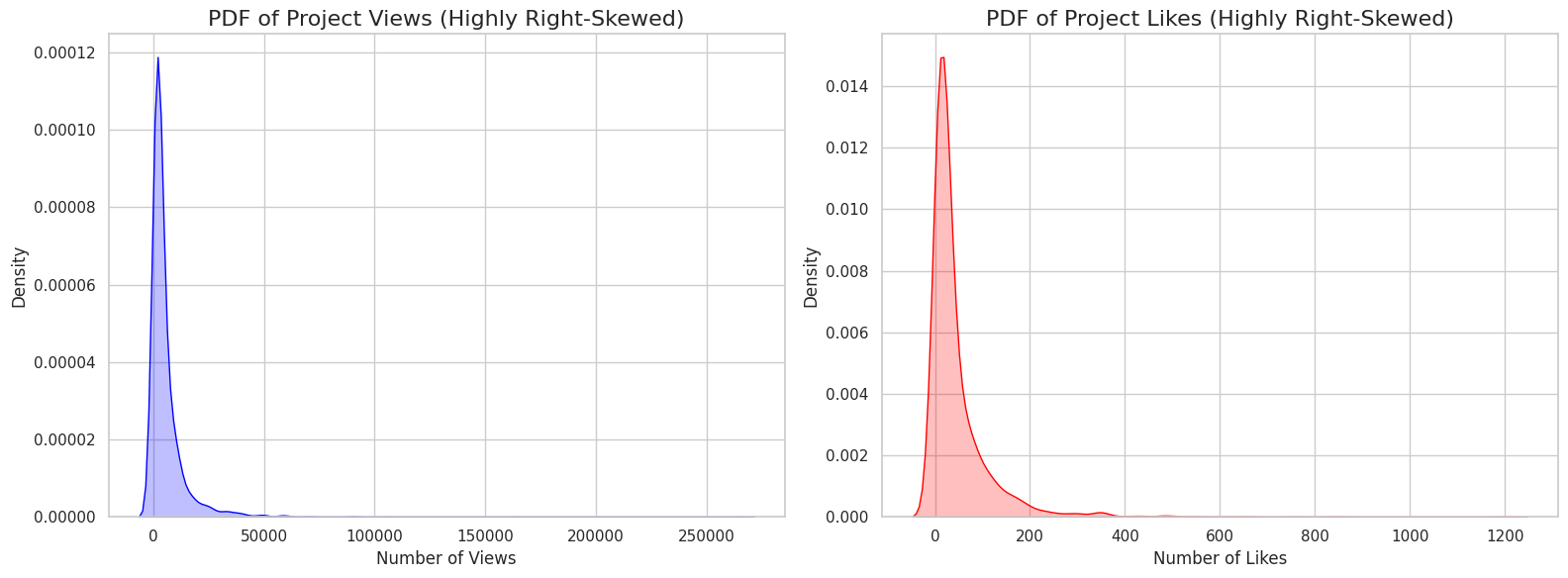 ](url)
Log-Transformation: Because of the skew, I created
log_Viewsandlog_Likescolumns. A 2D density plot of these log-transformed columns shows a strong positive correlation (as likes increase, views increase) and that the most "typical" project gets around 30-40 likes and 4,000-5,000 views.https://www.googleapis.com/download/storage/v1/b/kaggle-user-content/o/inbox%2F29431778%2Fd90e2039f1be11b53308ab7191b10954%2Fdownload%20(1).png?generation=1763013545903998&alt=media" alt="">
Top Instruments: I've also analyzed the most popular instruments to see which ones get the most engagement.
https://www.googleapis.com/download/storage/v1/b/kaggle-user-content/o/inbox%2F29431778%2F19fca1ce142ddddc1e16a5319a1f4fc5%2Fdownload%20(2).png?generation=1763013562400830&alt=media" alt="">
Column Descriptions
- Title: The name of the project.
- Project_Admin: The author/creator of the project.
- Image_URL: The URL for the project's cover image.
- Views: The total number of views (cleaned and imputed).
- Likes: The total number of likes/favorites (cleaned and imputed).
- Instruments: The main component or category tag (e.g., "Arduino", "Raspberry Pi").
- Z
DIPS-Plus: The Enhanced Database of Interacting Protein Structures for...
- data.niaid.nih.gov
- zenodo.org
Updated Oct 6, 2021ShareFacebookTwitterEmailClick to copy linkLink copiedCiteAlex Morehead; Chen Chen; Ada Sedova; Jianlin Cheng (2021). DIPS-Plus: The Enhanced Database of Interacting Protein Structures for Interface Prediction [Dataset]. https://data.niaid.nih.gov/resources?id=zenodo_4815266Dataset updatedOct 6, 2021Dataset provided byUniversity of Missouri
Oak Ridge National LaboratoryAuthorsAlex Morehead; Chen Chen; Ada Sedova; Jianlin ChengLicenseAttribution 4.0 (CC BY 4.0)https://creativecommons.org/licenses/by/4.0/
License information was derived automaticallyDescriptionThis dataset contains replication data for the paper titled "DIPS-Plus: The Enhanced Database of Interacting Protein Structures for Interface Prediction". The dataset consists of pickled Pandas DataFrame files that can be used to train and validate protein interface prediction models. This dataset also contains the externally generated residue-level PSAIA and HH-suite3 features for users' convenience (e.g. raw MSAs and profile HMMs for each protein complex). Our GitHub repository linked in the "Additional notes" metadata section below provides more details on how we parsed through these files to create training and validation datasets. The GitHub repository for DIPS-Plus also includes scripts that can be used to impute missing feature values and convert the final "raw" complexes into DGL-compatible graph objects.
Global Protests Dataset (1970–2025)
- kaggle.com
zipUpdated Sep 15, 2025ShareFacebookTwitterEmailClick to copy linkLink copiedCitePradeep Kumar Kohar (2025). Global Protests Dataset (1970–2025) [Dataset]. https://www.kaggle.com/datasets/pradeepkumarkohar/global-protests-dataset-19702025zip(960 bytes)Available download formatsDataset updatedSep 15, 2025AuthorsPradeep Kumar KoharLicenseMIT Licensehttps://opensource.org/licenses/MIT
License information was derived automaticallyDescription****📊 Global Protests Dataset (1970–2025) – Includes Nepal 2025 🔎 Overview**** This dataset is a self-created compilation of major worldwide protest events from 1970 to 2025. It includes movements such as the Vietnam War Protests (1970s), Tiananmen Square (China, 1989), Arab Spring (2011), George Floyd Protests (USA, 2020), and the Nepal Protests (2025).
The dataset is designed for practice and learning purposes. It contains intentional missing values (NaN) across some columns, making it ideal for practicing data cleaning, missing value handling (dropna, fillna), preprocessing, and visualization using Python (Pandas, Matplotlib, Seaborn, etc.).
📂 Columns Description 1. Year (int) → The year when the protest took place (1970–2025). 2. Country (string) → The country where the protest occurred. 3. Protest_Name (string) → The name/title of the protest event. 4. Estimated_Participants_Millions (float) → Approximate number of participants in millions (may contain missing values). 5. Casualties (int) → Number of casualties/deaths reported (may contain missing values). 6. Injuries (int) → Number of people injured (may contain missing values). 7. Cause (string) → The main reason/trigger of the protest (political, economic, social, etc.). 8. Government_Response (string) → How the government responded (e.g., peaceful negotiation, violent crackdown, policy change, or missing).
📌 Notes - This dataset was created by me for practice purposes only. - It is not an official historical source. - Best suited for: -- Practicing missing data handling (dropna, fillna) -- Performing exploratory data analysis (EDA) -- Visualizing social and political trends over time -- Testing machine learning preprocessing pipelines
Weather_dataset
- kaggle.com
zipUpdated Nov 13, 2025ShareFacebookTwitterEmailClick to copy linkLink copiedCiteAhmed Sayed (2025). Weather_dataset [Dataset]. https://www.kaggle.com/datasets/ahmedsayed0007/weather-datasetzip(291 bytes)Available download formatsDataset updatedNov 13, 2025AuthorsAhmed SayedDescriptionOverview
This dataset contains daily weather observations, including temperature, wind speed, and weather events recorded over multiple days. It is a simple and clean dataset suitable for beginners and intermediate users who want to practice data cleaning, handling missing values, exploratory data analysis (EDA), visualization, and basic predictive modeling.
Dataset Structure
Each row represents a single day's weather record.
Columns
day Date of the observation.
temperature — Recorded temperature of the day (in °F). windspeed — Wind speed of the day (in mph). event — Weather event such as Rain, Sunny, or Snow.
Key Characteristics
Contains missing values in temperature, windspeed, and event columns. Useful for practicing:
Data cleaning and imputation Time-series formatting Handling categorical data Basic statistical analysis Simple forecasting tasks
Intended Use
This dataset is suitable for educational and demonstration purposes, including:
Data preprocessing tutorials Pandas practice notebooks Visualization exercises Introductory machine learning tasks
Auction Data Set
- kaggle.com
zipUpdated Aug 8, 2024ShareFacebookTwitterEmailClick to copy linkLink copiedCiteSteve Shreedhar (2024). Auction Data Set [Dataset]. https://www.kaggle.com/noob2511/auction-data-setzip(451 bytes)Available download formatsDataset updatedAug 8, 2024AuthorsSteve ShreedharLicenseApache License, v2.0https://www.apache.org/licenses/LICENSE-2.0
License information was derived automaticallyDescriptionColumns Definition and Information of the data set
The auction dataset is a really small data set ( 19 items) which is being created for the sole purpose of learning pandas library.
The auction data set contains 5 columns :
1. Item :Gives the description of what items are being sold. 2. Bidding Price : Gives the price at which the item will start being sold at. 3. Selling Price : The selling price tells us at which amount the item was sold. 4. Calls :Calls indicate the number of times the items value was raised or decreased by the customer. 5. Bought By : Gives us the idea which customer bought the item.
Note: There are missing values, which we will try to fill. And yes some values might not make sense once we make those imputations, but this notebook is for the sole purpose of learning.
Netflix
- kaggle.com
zipUpdated Jul 29, 2025ShareFacebookTwitterEmailClick to copy linkLink copiedCitePrasanna@82 (2025). Netflix [Dataset]. https://www.kaggle.com/datasets/prasanna82/netflix/codezip(1400865 bytes)Available download formatsDataset updatedJul 29, 2025AuthorsPrasanna@82DescriptionNetflix Dataset Exploration and Visualization
This project involves an in-depth analysis of the Netflix dataset to uncover key trends and patterns in the streaming platform’s content offerings. Using Python libraries such as Pandas, NumPy, and Matplotlib, this notebook visualizes and interprets critical insights from the data.
Objectives:
Analyze the distribution of content types (Movies vs. TV Shows)
Identify the most prolific countries producing Netflix content
Study the ratings and duration of shows
Handle missing values using techniques like interpolation, forward-fill, and custom replacements
Enhance readability with bar charts, horizontal plots, and annotated visuals
Key Visualizations:
Bar charts for type distribution and country-wise contributions
Handling missing data in rating, duration, and date_added
Annotated plots showing values for clarity
Tools Used:
Python 3
Pandas for data wrangling
Matplotlib for visualizations
Jupyter Notebook for hands-on analysis
Outcome: This project provides a clear view of Netflix's content library, helping data enthusiasts and beginners understand how to process, clean, and visualize real-world datasets effectively.
Feel free to fork, adapt, and extend the work.
Divvy Trips Clean Dataset (Nov 2024 – Oct 2025)
- kaggle.com
zipUpdated Nov 14, 2025ShareFacebookTwitterEmailClick to copy linkLink copiedCiteYeshang Upadhyay (2025). Divvy Trips Clean Dataset (Nov 2024 – Oct 2025) [Dataset]. https://www.kaggle.com/datasets/yeshangupadhyay/divvy-trips-clean-dataset-nov-2024-oct-2025zip(170259034 bytes)Available download formatsDataset updatedNov 14, 2025AuthorsYeshang UpadhyayLicenseODC Public Domain Dedication and Licence (PDDL) v1.0http://www.opendatacommons.org/licenses/pddl/1.0/
License information was derived automaticallyDescription📌 Overview
This dataset contains a cleaned and transformed version of the public Divvy Bicycle Sharing Trip Data covering the period November 2024 to October 2025.
The original raw data is publicly released by the Chicago Open Data Portal, and has been cleaned using Pandas (Python) and DuckDB SQL for faster analysis.
This dataset is now ready for direct use in: - Exploratory Data Analysis (EDA) - SQL analytics - Machine learning - Time-series/trend analysis - Dashboard creation (Power BI / Tableau)📂 Source
Original Data Provider:
Chicago Open Data Portal – Divvy Trips
License: Open Data Commons Public Domain Dedication (PDDL)
This cleaned dataset only contains transformations; no proprietary or restricted data is included.🔧 Cleaning & Transformations Performed
- Combined monthly CSVs (Nov 2024 → Oct 2025)
- Removed duplicates
- Standardized datetime formats
- Created new fields:
ride_lengthday_of_weekhour_of_day
- Handled missing or null values
- Cleaned inconsistent station names
- Filtered invalid ride durations (negative or zero-length rides)
- Exported as a compressed
.csvfor optimized performance
📊 Columns in the Dataset
ride_idrideable_typestarted_atended_atstart_station_nameend_station_namestart_latstart_lngend_latend_lngmember_casualride_length(minutes)day_of_weekhour_of_day
💡 Use Cases
This dataset is suitable for: - DuckDB + SQL analytics - Pandas EDA - Visualization in Power BI, Tableau, Looker - Statistical analysis - Member vs. Casual rider behavioral analysis - Peak usage prediction
📝 Notes
This dataset is not the official Divvy dataset, but a cleaned, transformed, and analysis-ready version created for educational and analytical use.
FacebookTwitterEmailIn this Datasets i simply showed the handling of missing values in your data with help of python libraries such as NumPy and pandas. You can also see the use of Nan and Non values. Detecting, dropping and filling of null values.