COCO2017 Image Caption Train
- kaggle.com
zipUpdated May 30, 2024 Share
Share Facebook
 Twitter
 EmailClick to copy linkLink copiedCiteSeungjun Lee (2024). COCO2017 Image Caption Train [Dataset]. https://www.kaggle.com/datasets/seungjunleeofficial/coco2017-image-caption-trainzip(19236355851 bytes)Available download formatsDataset updatedMay 30, 2024AuthorsSeungjun LeeLicense
Attribution 4.0 (CC BY 4.0)https://creativecommons.org/licenses/by/4.0/
License information was derived automaticallyDescriptionThis dataset contains only the COCO 2017 train images (118K images) and a caption annotation JSON file, designed to fit within Google Colab's available disk space of approximately 50GB when connected to a GPU runtime.
If you're using PyTorch on Google Colab, you can easily utilize this dataset as follows:
Manually downloading and uploading the file to Colab can be time-consuming. Therefore, it's more efficient to download this data directly into Google Colab. Please ensure you have first added your Kaggle key to Google Colab. You can find more details on this process here
from google.colab import drive
import os
import torch
import torchvision.datasets as dset
import torchvision.transforms as transforms

os.environ["KAGGLE_KEY"] = userdata.get('KAGGLE_KEY')
os.environ["KAGGLE_USERNAME"] = userdata.get('KAGGLE_USERNAME')

# Download the Dataset and unzip it
!kaggle datasets download -d seungjunleeofficial/coco2017-image-caption-train
!mkdir "/content/Dataset"
!unzip "coco2017-image-caption-train" -d "/content/Dataset"


# load the dataset
cap = dset.CocoCaptions(root = '/content/Dataset/COCO2017 Image Captioning Train/train2017',
            annFile = '/content/Dataset/COCO2017 Image Captioning Train/captions_train2017.json',
            transform=transforms.PILToTensor())
You can then use the dataset in the following way:
print(f"Number of samples: {len(cap)}") img, target = cap[3] print(img.shape) print(target) # Output example: torch.Size([3, 425, 640]) # ['A zebra grazing on lush green grass in a field.', 'Zebra reaching its head down to ground where grass is.', # 'The zebra is eating grass in the sun.', 'A lone zebra grazing in some green grass.', # 'A Zebra grazing on grass in a green open field.']- h
learn_hf_food_not_food_image_captions
- huggingface.co
Updated Jun 15, 2024+ more versionsShareFacebookTwitterEmailClick to copy linkLink copiedCiteDaniel Bourke (2024). learn_hf_food_not_food_image_captions [Dataset]. https://huggingface.co/datasets/mrdbourke/learn_hf_food_not_food_image_captionsCroissantCroissant is a format for machine-learning datasets. Learn more about this at mlcommons.org/croissant.Dataset updatedJun 15, 2024AuthorsDaniel BourkeLicenseApache License, v2.0https://www.apache.org/licenses/LICENSE-2.0
License information was derived automaticallyDescriptionFood/Not Food Image Caption Dataset
Small dataset of synthetic food and not food image captions. Text generated using Mistral Chat/Mixtral. Can be used to train a text classifier on food/not_food image captions as a demo before scaling up to a larger dataset. See Colab notebook on how dataset was created.
Example usageimport random from datasets import load_dataset
Load dataset
loaded_dataset = load_dataset("mrdbourke/learn_hf_food_not_food_image_captions")
Get… See the full description on the dataset page: https://huggingface.co/datasets/mrdbourke/learn_hf_food_not_food_image_captions.
algonauts_2023_tutorial_Data
- kaggle.com
zipUpdated Apr 26, 2025ShareFacebookTwitterEmailClick to copy linkLink copiedCiteLaxmikant Nishad (2025). algonauts_2023_tutorial_Data [Dataset]. https://www.kaggle.com/datasets/laxmikantnishad/algonauts-2023-tutorial-datazip(4617420530 bytes)Available download formatsDataset updatedApr 26, 2025AuthorsLaxmikant NishadDescriptionI don't claim this dataset. I got it from the Algonauts website 2023. only using to load in colab
- d
Data from: EGS Collab Experiment 2: Distributed Fiber Optic Temperature Data...
- catalog.data.gov
- data.openei.org
- +2more
Updated Jan 20, 2025+ more versionsShareFacebookTwitterEmailClick to copy linkLink copiedCiteLawrence Berkeley National Laboratory (2025). EGS Collab Experiment 2: Distributed Fiber Optic Temperature Data (DTS) [Dataset]. https://catalog.data.gov/dataset/egs-collab-experiment-2-distributed-fiber-optic-temperature-data-dts-c2e68Dataset updatedJan 20, 2025Dataset provided byLawrence Berkeley National LaboratoryDescriptionDistributed fiber optic sensing was an important part of the monitoring system for EGS Collab Experiment #2. A single loop of custom fiber package was grouted into the four monitoring boreholes that bracketed the experiment volume. This fiber package contained two multi-mode fibers and four single-mode fibers. These fibers were connected to an array of fiber optic interrogator units, each targeting a different measurement. The distributed temperature system (DTS) consisted of a Silixa XT-DTS unit, connected to both ends of one of the two multi-mode fibers. This system measured absolute temperature along the entire length of fiber for the duration of the experiment at a sampling rate of approximately 10 minutes. This dataset includes both raw data in XML format from the XT-DTS, as well as a processed dataset with the sections of data pertaining only to the boreholes are extracted. We have also included a report that provides all of the relevant details necessary for users to process and interpret the data for themselves. Please read this accompanying report. If, after reading it, there are still outstanding questions, please do not hesitate to contact us. Happy processing.
Brain Tumor Classification
- kaggle.com
zipUpdated Nov 26, 2022ShareFacebookTwitterEmailClick to copy linkLink copiedCiteTaneem UR Rehman (2022). Brain Tumor Classification [Dataset]. https://www.kaggle.com/datasets/taneemurrehman/brain-tumor-classificationzip(91002358 bytes)Available download formatsDataset updatedNov 26, 2022AuthorsTaneem UR RehmanDescriptionPlease follow the steps below to download and use Kaggle data within Google Colab:
1) from google.colab import files files.upload()
Choose the kaggle.json file that you downloaded 2) ! mkdir ~/.kaggle
! cp kaggle.json ~/.kaggle/
Make directory named kaggle and copy kaggle.json file there. 4) ! chmod 600 ~/.kaggle/kaggle.json
Change the permissions of the file. 5) ! kaggle datasets list - That's all ! You can check if everything's okay by running this command.
Use unzip command to unzip the data:
unzip train data there,
! unzip train.zip -d train
- d
Data from: EGS Collab Experiment 2: Wireline Geophysical Well Logs
- catalog.data.gov
- gdr.openei.org
- +3more
Updated Jan 20, 2025ShareFacebookTwitterEmailClick to copy linkLink copiedCiteLawrence Berkeley National Laboratory (2025). EGS Collab Experiment 2: Wireline Geophysical Well Logs [Dataset]. https://catalog.data.gov/dataset/egs-collab-experiment-2-wireline-geophysical-well-logs-76f6eDataset updatedJan 20, 2025Dataset provided byLawrence Berkeley National LaboratoryDescriptionThis is the full wireline geophysical datasets for characterization of the EGS Collab Experiment #2 testbed. A metadata fill is included within the dataset explaining the logs, fracture picks, etc. Eleven boreholes were drilled for this testbed and each one was logged with north seeking gyro, optical televiewer, acoustic televiewer, fluid temperature conductivity, resistivity and gamma, and full waveform sonic. In these folders are the processed results as text, csv and pdf files along with the raw data which will need to be read by WellCAD.
Sample Park Analysis
- figshare.com
zipUpdated Nov 2, 2025ShareFacebookTwitterEmailClick to copy linkLink copiedCiteEric Delmelle (2025). Sample Park Analysis [Dataset]. http://doi.org/10.6084/m9.figshare.30509021.v1zipAvailable download formatsUnique identifierhttps://doi.org/10.6084/m9.figshare.30509021.v1Dataset updatedNov 2, 2025AuthorsEric DelmelleLicenseAttribution 4.0 (CC BY 4.0)https://creativecommons.org/licenses/by/4.0/
License information was derived automaticallyDescriptionREADME – Sample Park Analysis## OverviewThis repository contains a Google Colab / Jupyter notebook and accompanying dataset used for analyzing park features and associated metrics. The notebook demonstrates data loading, cleaning, and exploratory analysis of the
Hope_Park_original.csvfile.## Contents- sample park analysis.ipynb — The main analysis notebook (Colab/Jupyter format)- Hope_Park_original.csv — Source dataset containing park information- README.md — Documentation for the contents and usage## Usage1. Open the notebook in Google Colab or Jupyter.2. Upload theHope_Park_original.csvfile to the working directory (or adjust the file path in the notebook).3. Run each cell sequentially to reproduce the analysis.## RequirementsThe notebook uses standard Python data science libraries:```pythonpandasnumpymatplotlibseaborn- d
Data from: EGS Collab Experiment 1: Wireline Geophysical Well Logs
- catalog.data.gov
- gdr.openei.org
- +2more
Updated Jan 20, 2025ShareFacebookTwitterEmailClick to copy linkLink copiedCiteLawrence Berkeley National Laboratory (2025). EGS Collab Experiment 1: Wireline Geophysical Well Logs [Dataset]. https://catalog.data.gov/dataset/egs-collab-experiment-1-wireline-geophysical-well-logs-b3ebfDataset updatedJan 20, 2025Dataset provided byLawrence Berkeley National LaboratoryDescriptionThis is the full wireline geophysical datasets for characterization of the EGS Collab Experiment #1 testbed on the 4850 level. A metadata file is included within the dataset explaining the logs, fracture picks, etc. Eight boreholes were drilled for this testbed and each one was logged with north seeking gyro, optical televiewer, acoustic televiewer, fluid temperature conductivity, resistivity and gamma, and full waveform sonic. In these folders are the processed results as text, csv, and pdf files, along with the raw data which will need to be read using WellCAD software.
- m
Data for "Prediction of Phakic Intraocular Lens Vault Using Machine Learning...
- data.mendeley.com
Updated Nov 18, 2020+ more versionsShareFacebookTwitterEmailClick to copy linkLink copiedCiteTaeKeun Yoo (2020). Data for "Prediction of Phakic Intraocular Lens Vault Using Machine Learning of Anterior Segment Optical Coherence Tomography Metrics" [Dataset]. http://doi.org/10.17632/ffn745r57z.1Unique identifierhttps://doi.org/10.17632/ffn745r57z.1Dataset updatedNov 18, 2020AuthorsTaeKeun YooLicenseAttribution-NonCommercial 3.0 (CC BY-NC 3.0)https://creativecommons.org/licenses/by-nc/3.0/
License information was derived automaticallyDescriptionPrediction of Phakic Intraocular Lens Vault Using Machine Learning of Anterior Segment Optical Coherence Tomography Metrics. Authors: Kazutaka Kamiya, MD, PhD1, Ik Hee Ryu, MD, MS2, Tae Keun Yoo, MD2, Jung Sub Kim MD2, In Sik Lee, MD, PhD2, Jin Kook Kim MD2, Wakako Ando CO3, Nobuyuki Shoji, MD, PhD3, Tomofusa, Yamauchi, MD, PhD4, Hitoshi Tabuchi, MD, PhD4. Author Affiliation: 1Visual Physiology, School of Allied Health Sciences, Kitasato University, Kanagawa, Japan, 2B&VIIT Eye Center, Seoul, Korea, 3Department of Ophthalmology, School of Medicine, Kitasato University, Kanagawa, Japan, 4Department of Ophthalmology, Tsukazaki Hospital, Hyogo, Japan.
We hypothesize that machine learning of preoperative biometric data obtained by the As-OCT may be clinically beneficial for predicting the actual ICL vault. Therefore, we built the machine learning model using Random Forest to predict ICL vault after surgery.
This multicenter study comprised one thousand seven hundred forty-five eyes of 1745 consecutive patients (656 men and 1089 women), who underwent EVO ICL implantation (V4c and V5 Visian ICL with KS-AquaPORT) for the correction of moderate to high myopia and myopic astigmatism, and who completed at least a 1-month follow-up, at Kitasato University Hospital (Kanagawa, Japan), or at B&VIIT Eye Center (Seoul, Korea).
This data file (RFR_model(feature=12).mat) is the final trained random forest model for MATLAB 2020a.
Python version:
from sklearn.model_selection import train_test_split import pandas as pd import numpy as np from sklearn.ensemble import RandomForestClassifier from sklearn.ensemble import RandomForestRegressor
connect data in your google drive
from google.colab import auth auth.authenticate_user() from google.colab import drive drive.mount('/content/gdrive')
Change the path for the custom data
In this case, we used ICL vault prediction using preop measurement
dataset = pd.read_csv('gdrive/My Drive/ICL/data_icl.csv') dataset.head()
optimal features (sorted by importance) :
1. ICL size 2. ICL power 3. LV 4. CLR 5. ACD 6. ATA
7. MSE 8.Age 9. Pupil size 10. WTW 11. CCT 12. ACW
y = dataset['Vault_1M'] X = dataset.drop(['Vault_1M'], axis = 1)
Split the dataset to train and test data
For a simple validation test, we split data to 8:2
train_X, test_X, train_y, test_y = train_test_split(X, y, test_size=0.2, random_state=0)
Optimal parameter search could be performed in this section
parameters = {'bootstrap': True, 'min_samples_leaf': 3, 'n_estimators': 500, 'criterion': 'mae' 'min_samples_split': 10, 'max_features': 'sqrt', 'max_depth': 6, 'max_leaf_nodes': None}
RF_model = RandomForestRegressor(**parameters) RF_model.fit(train_X, train_y) RF_predictions = RF_model.predict(test_X) importance = RF_model.feature_importances_
- B
Python Code for Visualizing COVID-19 data
- borealisdata.ca
- datasetcatalog.nlm.nih.gov
- +1more
Updated Dec 16, 2023ShareFacebookTwitterEmailClick to copy linkLink copiedCiteRyan Chartier; Geoffrey Rockwell (2023). Python Code for Visualizing COVID-19 data [Dataset]. http://doi.org/10.5683/SP3/PYEQL0CroissantCroissant is a format for machine-learning datasets. Learn more about this at mlcommons.org/croissant.Unique identifierhttps://doi.org/10.5683/SP3/PYEQL0Dataset updatedDec 16, 2023Dataset provided byBorealisAuthorsRyan Chartier; Geoffrey RockwellLicenseCC0 1.0 Universal Public Domain Dedicationhttps://creativecommons.org/publicdomain/zero/1.0/
License information was derived automaticallyDescriptionThe purpose of this code is to produce a line graph visualization of COVID-19 data. This Jupyter notebook was built and run on Google Colab. This code will serve mostly as a guide and will need to be adapted where necessary to be run locally. The separate COVID-19 datasets uploaded to this Dataverse can be used with this code. This upload is made up of the IPYNB and PDF files of the code.
Top Rated TV Shows
- kaggle.com
zipUpdated Jan 5, 2025ShareFacebookTwitterEmailClick to copy linkLink copiedCiteShreya Gupta (2025). Top Rated TV Shows [Dataset]. https://www.kaggle.com/datasets/shreyajii/top-rated-tv-showszip(314571 bytes)Available download formatsDataset updatedJan 5, 2025AuthorsShreya GuptaLicenseApache License, v2.0https://www.apache.org/licenses/LICENSE-2.0
License information was derived automaticallyDescriptionThis dataset provides information about top-rated TV shows, collected from The Movie Database (TMDb) API. It can be used for data analysis, recommendation systems, and insights on popular television content.
Key Stats:
Total Pages: 109 Total Results: 2098 TV shows Data Source: TMDb API Sorting Criteria: Highest-rated by vote_average (average rating) with a minimum vote count of 200 Data Fields (Columns):
id: Unique identifier for the TV show name: Title of the TV show vote_average: Average rating given by users vote_count: Total number of votes received first_air_date: The date when the show was first aired original_language: Language in which the show was originally produced genre_ids: Genre IDs linked to the show's genres overview: A brief summary of the show popularity: Popularity score based on audience engagement poster_path: URL path for the show's poster image Accessing the Dataset via API (Python Example):
python Copy code import requests
api_key = 'YOUR_API_KEY_HERE' url = "https://api.themoviedb.org/3/discover/tv" params = { 'api_key': api_key, 'include_adult': 'false', 'language': 'en-US', 'page': 1, 'sort_by': 'vote_average.desc', 'vote_count.gte': 200 }
response = requests.get(url, params=params) data = response.json()
Display the first show
print(data['results'][0]) Dataset Use Cases:
Data Analysis: Explore trends in highly-rated TV shows. Recommendation Systems: Build personalized TV show suggestions. Visualization: Create charts to showcase ratings or genre distribution. Machine Learning: Predict show popularity using historical data. Exporting and Sharing the Dataset (Google Colab Example):
python Copy code import pandas as pd
Convert the API data to a DataFrame
df = pd.DataFrame(data['results'])
Save to CSV and upload to Google Drive
from google.colab import drive drive.mount('/content/drive') df.to_csv('/content/drive/MyDrive/top_rated_tv_shows.csv', index=False) Ways to Share the Dataset:
Google Drive: Upload and share a public link. Kaggle: Create a public dataset for collaboration. GitHub: Host the CSV file in a repository for easy sharing.
- R
Accident Detection Model Dataset
- universe.roboflow.com
zipUpdated Apr 8, 2024ShareFacebookTwitterEmailClick to copy linkLink copiedCiteAccident detection model (2024). Accident Detection Model Dataset [Dataset]. https://universe.roboflow.com/accident-detection-model/accident-detection-model/model/1zipAvailable download formatsDataset updatedApr 8, 2024Dataset authored and provided byAccident detection modelLicenseAttribution 4.0 (CC BY 4.0)https://creativecommons.org/licenses/by/4.0/
License information was derived automaticallyVariables measuredAccident Bounding BoxesDescriptionAccident-Detection-Model
Accident Detection Model is made using YOLOv8, Google Collab, Python, Roboflow, Deep Learning, OpenCV, Machine Learning, Artificial Intelligence. It can detect an accident on any accident by live camera, image or video provided. This model is trained on a dataset of 3200+ images, These images were annotated on roboflow.
Problem Statement
- Road accidents are a major problem in India, with thousands of people losing their lives and many more suffering serious injuries every year.
- According to the Ministry of Road Transport and Highways, India witnessed around 4.5 lakh road accidents in 2019, which resulted in the deaths of more than 1.5 lakh people.
- The age range that is most severely hit by road accidents is 18 to 45 years old, which accounts for almost 67 percent of all accidental deaths.
Accidents survey
https://user-images.githubusercontent.com/78155393/233774342-287492bb-26c1-4acf-bc2c-9462e97a03ca.png" alt="Survey">
Literature Survey
- Sreyan Ghosh in Mar-2019, The goal is to develop a system using deep learning convolutional neural network that has been trained to identify video frames as accident or non-accident.
- Deeksha Gour Sep-2019, uses computer vision technology, neural networks, deep learning, and various approaches and algorithms to detect objects.
Research Gap
- Lack of real-world data - We trained model for more then 3200 images.
- Large interpretability time and space needed - Using google collab to reduce interpretability time and space required.
- Outdated Versions of previous works - We aer using Latest version of Yolo v8.
Proposed methodology
- We are using Yolov8 to train our custom dataset which has been 3200+ images, collected from different platforms.
- This model after training with 25 iterations and is ready to detect an accident with a significant probability.
Model Set-up
Preparing Custom dataset
- We have collected 1200+ images from different sources like YouTube, Google images, Kaggle.com etc.
- Then we annotated all of them individually on a tool called roboflow.
- During Annotation we marked the images with no accident as NULL and we drew a box on the site of accident on the images having an accident
- Then we divided the data set into train, val, test in the ratio of 8:1:1
- At the final step we downloaded the dataset in yolov8 format.
#### Using Google Collab - We are using google colaboratory to code this model because google collab uses gpu which is faster than local environments.
- You can use Jupyter notebooks, which let you blend code, text, and visualisations in a single document, to write and run Python code using Google Colab.
- Users can run individual code cells in Jupyter Notebooks and quickly view the results, which is helpful for experimenting and debugging. Additionally, they enable the development of visualisations that make use of well-known frameworks like Matplotlib, Seaborn, and Plotly.
- In Google collab, First of all we Changed runtime from TPU to GPU.
- We cross checked it by running command ‘!nvidia-smi’
#### Coding - First of all, We installed Yolov8 by the command ‘!pip install ultralytics==8.0.20’
- Further we checked about Yolov8 by the command ‘from ultralytics import YOLO from IPython.display import display, Image’
- Then we connected and mounted our google drive account by the code ‘from google.colab import drive drive.mount('/content/drive')’
- Then we ran our main command to run the training process ‘%cd /content/drive/MyDrive/Accident Detection model !yolo task=detect mode=train model=yolov8s.pt data= data.yaml epochs=1 imgsz=640 plots=True’
- After the training we ran command to test and validate our model ‘!yolo task=detect mode=val model=runs/detect/train/weights/best.pt data=data.yaml’ ‘!yolo task=detect mode=predict model=runs/detect/train/weights/best.pt conf=0.25 source=data/test/images’
- Further to get result from any video or image we ran this command ‘!yolo task=detect mode=predict model=runs/detect/train/weights/best.pt source="/content/drive/MyDrive/Accident-Detection-model/data/testing1.jpg/mp4"’
- The results are stored in the runs/detect/predict folder.
Hence our model is trained, validated and tested to be able to detect accidents on any video or image.
Challenges I ran into
I majorly ran into 3 problems while making this model
- I got difficulty while saving the results in a folder, as yolov8 is latest version so it is still underdevelopment. so i then read some blogs, referred to stackoverflow then i got to know that we need to writ an extra command in new v8 that ''save=true'' This made me save my results in a folder.
- I was facing problem on cvat website because i was not sure what
- h
gigaspeech
- huggingface.co
- opendatalab.com
Updated Aug 30, 2022+ more versionsShareFacebookTwitterEmailClick to copy linkLink copiedCiteSpeechColab (2022). gigaspeech [Dataset]. http://doi.org/10.57967/hf/6261Unique identifierhttps://doi.org/10.57967/hf/6261Dataset updatedAug 30, 2022Dataset authored and provided bySpeechColabLicenseApache License, v2.0https://www.apache.org/licenses/LICENSE-2.0
License information was derived automaticallyDescriptionGigaSpeech is an evolving, multi-domain English speech recognition corpus with 10,000 hours of high quality labeled audio suitable for supervised training, and 40,000 hours of total audio suitable for semi-supervised and unsupervised training. Around 40,000 hours of transcribed audio is first collected from audiobooks, podcasts and YouTube, covering both read and spontaneous speaking styles, and a variety of topics, such as arts, science, sports, etc. A new forced alignment and segmentation pipeline is proposed to create sentence segments suitable for speech recognition training, and to filter out segments with low-quality transcription. For system training, GigaSpeech provides five subsets of different sizes, 10h, 250h, 1000h, 2500h, and 10000h. For our 10,000-hour XL training subset, we cap the word error rate at 4% during the filtering/validation stage, and for all our other smaller training subsets, we cap it at 0%. The DEV and TEST evaluation sets, on the other hand, are re-processed by professional human transcribers to ensure high transcription quality.
Wikimedia Structured Dataset Navigator (JSONL)
- kaggle.com
zipUpdated Apr 23, 2025ShareFacebookTwitterEmailClick to copy linkLink copiedCiteMehranism (2025). Wikimedia Structured Dataset Navigator (JSONL) [Dataset]. https://www.kaggle.com/datasets/mehranism/wikimedia-structured-dataset-navigator-jsonlzip(266196504 bytes)Available download formatsDataset updatedApr 23, 2025AuthorsMehranismLicensehttps://creativecommons.org/publicdomain/zero/1.0/https://creativecommons.org/publicdomain/zero/1.0/
Description📚 Overview: This dataset provides a compact and efficient way to explore the massive "Wikipedia Structured Contents" dataset by Wikimedia Foundation, which consists of 38 large JSONL files (each ~2.5GB). Loading these directly in Kaggle or Colab is impractical due to resource constraints. This file index solves that problem.
🔍 What’s Inside: This dataset includes a single JSONL file named
wiki_structured_dataset_navigator.jsonlthat contains metadata for every file in the English portion of the Wikimedia dataset.Each line in the JSONL file is a JSON object with the following fields: -
file_name: the actual filename in the source dataset (e.g.,enwiki_namespace_0_0.jsonl) -file_index: the numeric row index of the file -name: the Wikipedia article title or identifier -url: a link to the full article on Wikipedia -description: a short description or abstract of the article (when available)🛠 Use Case: Use this dataset to search by keyword, article name, or description to find which specific files from the full Wikimedia dataset contain the topics you're interested in. You can then download only the relevant file(s) instead of the entire dataset.
⚡️ Benefits: - Lightweight (~MBs vs. GBs) - Easy to load and search - Great for indexing, previewing, and subsetting the Wikimedia dataset - Saves time, bandwidth, and compute resources
📎 Example Usage (Python): ```python import kagglehub import json import pandas as pd import numpy as np import os from tqdm import tqdm from datetime import datetime import re
def read_jsonl(file_path, max_records=None): data = [] with open(file_path, 'r', encoding='utf-8') as f: for i, line in enumerate(tqdm(f)): if max_records and i >= max_records: break data.append(json.loads(line)) return data
file_path = kagglehub.dataset_download("mehranism/wikimedia-structured-dataset-navigator-jsonl",path="wiki_structured_dataset_navigator.jsonl") data = read_jsonl(file_path) print(f"Successfully loaded {len(data)} records")
df = pd.DataFrame(data) print(f"Dataset shape: {df.shape}") print(" Columns in the dataset:") for col in df.columns: print(f"- {col}")
This dataset is perfect for developers working on:
- Retrieval-Augmented Generation (RAG)
- Large Language Model (LLM) fine-tuning
- Search and filtering pipelines
- Academic research on structured Wikipedia content

💡 Tip:
Pair this index with the original [Wikipedia Structured Contents dataset](https://www.kaggle.com/datasets/wikimedia-foundation/wikipedia-structured-contents) for full article access.

📃 Format:
- File: `wiki_structured_dataset_navigator.jsonl`
- Format: JSON Lines (1 object per line)
- Encoding: UTF-8

---

### **Tags**
wikipedia, wikimedia, jsonl, structured-data, search-index, metadata, file-catalog, dataset-index, large-language-models, machine-learning ```
Licensing
CC0: Public Domain Dedication(Recommended for open indexing tools with no sensitive data.)
Social Media and Mental Health
- kaggle.com
zipUpdated Jul 18, 2023ShareFacebookTwitterEmailClick to copy linkLink copiedCiteSouvikAhmed071 (2023). Social Media and Mental Health [Dataset]. https://www.kaggle.com/datasets/souvikahmed071/social-media-and-mental-healthzip(10944 bytes)Available download formatsDataset updatedJul 18, 2023AuthorsSouvikAhmed071LicenseOpen Database License (ODbL) v1.0https://www.opendatacommons.org/licenses/odbl/1.0/
License information was derived automaticallyDescriptionThis dataset was originally collected for a data science and machine learning project that aimed at investigating the potential correlation between the amount of time an individual spends on social media and the impact it has on their mental health.
The project involves conducting a survey to collect data, organizing the data, and using machine learning techniques to create a predictive model that can determine whether a person should seek professional help based on their answers to the survey questions.
This project was completed as part of a Statistics course at a university, and the team is currently in the process of writing a report and completing a paper that summarizes and discusses the findings in relation to other research on the topic.
The following is the Google Colab link to the project, done on Jupyter Notebook -
https://colab.research.google.com/drive/1p7P6lL1QUw1TtyUD1odNR4M6TVJK7IYN
The following is the GitHub Repository of the project -
https://github.com/daerkns/social-media-and-mental-health
Libraries used for the Project -
Pandas
Numpy
Matplotlib
Seaborn
Sci-kit Learn
US Consumer Complaints Against Businesses
- kaggle.com
zipUpdated Oct 9, 2022ShareFacebookTwitterEmailClick to copy linkLink copiedCiteJeffery Mandrake (2022). US Consumer Complaints Against Businesses [Dataset]. https://www.kaggle.com/jefferymandrake/us-consumer-complaints-dataset-through-2019zip(343188956 bytes)Available download formatsDataset updatedOct 9, 2022AuthorsJeffery MandrakeLicensehttps://creativecommons.org/publicdomain/zero/1.0/https://creativecommons.org/publicdomain/zero/1.0/
Description2,121,458 records
I used Google Colab to check out this dataset and pull the column names using Pandas.
Sample code example: Python Pandas read csv file compressed with gzip and load into Pandas dataframe https://pastexy.com/106/python-pandas-read-csv-file-compressed-with-gzip-and-load-into-pandas-dataframe
Columns: ['Date received', 'Product', 'Sub-product', 'Issue', 'Sub-issue', 'Consumer complaint narrative', 'Company public response', 'Company', 'State', 'ZIP code', 'Tags', 'Consumer consent provided?', 'Submitted via', 'Date sent to company', 'Company response to consumer', 'Timely response?', 'Consumer disputed?', 'Complaint ID']
I did not modify the dataset.
Use it to practice with dataframes - Pandas or PySpark on Google Colab:
!unzip complaints.csv.zip
import pandas as pd df = pd.read_csv('complaints.csv') df.columns
df.head() etc.
TMF Business Process Framework Dataset for Neo4j
- kaggle.com
zipUpdated Dec 4, 2023ShareFacebookTwitterEmailClick to copy linkLink copiedCiteAleksei Golovin (2023). TMF Business Process Framework Dataset for Neo4j [Dataset]. https://www.kaggle.com/datasets/algord/tmf-business-process-framework-dataset-for-neo4jzip(13261206 bytes)Available download formatsDataset updatedDec 4, 2023AuthorsAleksei GolovinLicenseApache License, v2.0https://www.apache.org/licenses/LICENSE-2.0
License information was derived automaticallyDescriptionTMF Business Process Framework Dataset for Neo4j
The dataset is a Neo4j knowledge graph based on TMF Business Process Framework v22.0 data.
CSV files contain data about the model entities, and the JSON file contains knowledge graph mapping.
The script used to generate CSV files based on the XML model can be found here.To import the dataset, download the zip archive and upload it to Neo4j.
You also can check this dataset here.
deaplearninexamAU2024
- kaggle.com
zipUpdated Dec 5, 2024ShareFacebookTwitterEmailClick to copy linkLink copiedCitechristoffer fuglkjær (2024). deaplearninexamAU2024 [Dataset]. https://www.kaggle.com/datasets/christofferfuglkjr/deeplearninexamzip(12364640070 bytes)Available download formatsDataset updatedDec 5, 2024Authorschristoffer fuglkjærDescriptionThis is just a reuploaded version of https://www.kaggle.com/datasets/ubitquitin/geolocation-geoguessr-images-50k?resource=download. But with the GeoGuessr UI cropped out and countries sorted into regions. This dataset is just used to make reloading training data in Google Colab faster.
Electronics Project(2600+ projects)
- kaggle.com
zipUpdated Nov 13, 2025ShareFacebookTwitterEmailClick to copy linkLink copiedCiteNICK-2908 (2025). Electronics Project(2600+ projects) [Dataset]. https://www.kaggle.com/datasets/nick2908/electronics-project2600-projectszip(274002 bytes)Available download formatsDataset updatedNov 13, 2025AuthorsNICK-2908Description**Summary ** This dataset contains over 2,600 circuit projects scraped from Instructables, focusing on the "Circuits" category. It includes project titles, authors, engagement metrics (views, likes), and the primary component used (Instruments).
** How This Data Was Collected**
I built a web scraper using Python and Selenium to gather all project links (over 2,600 of them) by handling the "Load All" button. The full page source was saved, and I then used BeautifulSoup to parse the HTML and extract the raw data for each project.
Data Cleaning (The Important Part!)
The raw data was very messy. I performed a full data cleaning pipeline in a Colab notebook using Pandas.
- Converted Text to Numbers:
ViewsandLikeswere text fields (object). - Handled "K" Values: Found and converted "K" values (e.g., "2.2K") into proper numbers (2200).
- Handled Missing Data: Replaced all "N/A" strings with null values.
- Mean Imputation: To keep the dataset complete, I filled all missing
LikesandViewswith the mean (average) of the respective column.
Key Insights & Analysis
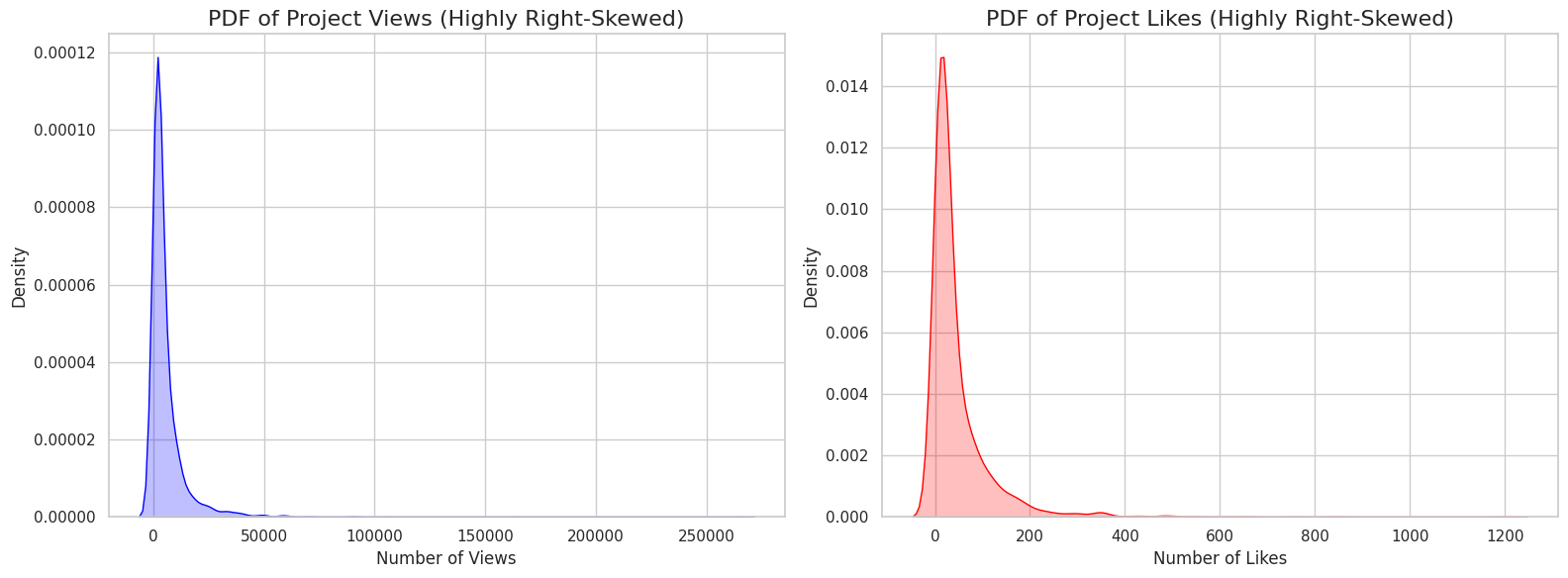
- "Viral" Effect (High Skew): The
ViewsandLikesdata is highly right-skewed (skewness of ~9.5). This shows a "viral" effect where a tiny number of superstar projects get the vast majority of all views and likes.
[
 ](url)
Log-Transformation: Because of the skew, I created
log_Viewsandlog_Likescolumns. A 2D density plot of these log-transformed columns shows a strong positive correlation (as likes increase, views increase) and that the most "typical" project gets around 30-40 likes and 4,000-5,000 views.https://www.googleapis.com/download/storage/v1/b/kaggle-user-content/o/inbox%2F29431778%2Fd90e2039f1be11b53308ab7191b10954%2Fdownload%20(1).png?generation=1763013545903998&alt=media" alt="">
Top Instruments: I've also analyzed the most popular instruments to see which ones get the most engagement.
https://www.googleapis.com/download/storage/v1/b/kaggle-user-content/o/inbox%2F29431778%2F19fca1ce142ddddc1e16a5319a1f4fc5%2Fdownload%20(2).png?generation=1763013562400830&alt=media" alt="">
Column Descriptions
- Title: The name of the project.
- Project_Admin: The author/creator of the project.
- Image_URL: The URL for the project's cover image.
- Views: The total number of views (cleaned and imputed).
- Likes: The total number of likes/favorites (cleaned and imputed).
- Instruments: The main component or category tag (e.g., "Arduino", "Raspberry Pi").
OpenOrca
- kaggle.com
- opendatalab.com
- +1more
zipUpdated Nov 22, 2023ShareFacebookTwitterEmailClick to copy linkLink copiedCiteThe Devastator (2023). OpenOrca [Dataset]. https://www.kaggle.com/datasets/thedevastator/open-orca-augmented-flan-dataset/versions/2zip(2548102631 bytes)Available download formatsDataset updatedNov 22, 2023AuthorsThe DevastatorLicensehttps://creativecommons.org/publicdomain/zero/1.0/https://creativecommons.org/publicdomain/zero/1.0/
DescriptionOpen-Orca Augmented FLAN Dataset
Unlocking Advanced Language Understanding and ML Model Performance
By Huggingface Hub [source]
About this dataset
The Open-Orca Augmented FLAN Collection is a revolutionary dataset that unlocks new levels of language understanding and machine learning model performance. This dataset was created to support research on natural language processing, machine learning models, and language understanding through leveraging the power of reasoning trace-enhancement techniques. By enabling models to understand complex relationships between words, phrases, and even entire sentences in a more robust way than ever before, this dataset provides researchers expanded opportunities for furthering the progress of linguistics research. With its unique combination of features including system prompts, questions from users and responses from systems, this dataset opens up exciting possibilities for deeper exploration into the cutting edge concepts underlying advanced linguistics applications. Experience a new level of accuracy and performance - explore Open-Orca Augmented FLAN Collection today!
More Datasets
For more datasets, click here.
Featured Notebooks
- 🚨 Your notebook can be here! 🚨!
How to use the dataset
This guide provides an introduction to the Open-Orca Augmented FLAN Collection dataset and outlines how researchers can utilize it for their language understanding and natural language processing (NLP) work. The Open-Orca dataset includes system prompts, questions posed by users, and responses from the system.
Getting Started The first step is to download the data set from Kaggle at https://www.kaggle.com/openai/open-orca-augmented-flan and save it in a project directory of your choice on your computer or cloud storage space. Once you have downloaded the data set, launch your ‘Jupyter Notebook’ or ‘Google Colab’ program with which you want to work with this data set.
Exploring & Preprocessing Data: To get a better understanding of the features in this dataset, import them into Pandas DataFrame as shown below. You can use other libraries as per your need:
import pandas as pd   # Library used for importing datasets into Python

df = pd.read_csv('train.csv') #Imports train csv file into Pandas};#DataFrame

df[['system_prompt','question','response']].head() #Views top 5 rows with columns 'system_prompt','question','response'
After importing check each feature using basic descriptive statistics such Pandas groupby statement: We can use groupby statements to have greater clarity over the variables present in each feature(elements). The below command will show counts of each element in System Prompt column present under train CVS file :
 df['system prompt'].value_counts().head()#shows count of each element present under 'System Prompt'column
 Output: User says hello guys 587 <br>System asks How are you?: 555 times<br>User says I am doing good: 487 times <br>..and so on
Data Transformation: After inspecting & exploring different features one may want/need certain changes that best suits their needs from this dataset before training modeling algorithms on it.
Common transformation steps include : Removing punctuation marks : Since punctuation marks may not add any value to computation operations , we can remove them using regex functions write .replace('[^A-Za -z]+','' ) asResearch Ideas
- Automated Question Answering: Leverage the dataset to train and develop question answering models that can provide tailored answers to specific user queries while retaining language understanding abilities.
- Natural Language Understanding: Use the dataset as an exploratory tool for fine-tuning natural language processing applications, such as sentiment analysis, document categorization, parts-of-speech tagging and more.
- Machine Learning Optimizations: The dataset can be used to build highly customized machine learning pipelines that allow users to harness the power of conditioning data with pre-existing rules or models for improved accuracy and performance in automated tasks
Acknowledgements
If you use this dataset in your research, please credit the original authors. Data Source
License
License: CC0 1.0 Universal (CC0 1.0) - Public Domain Dedication No Copyright - You can copy, modify, distribute and perform the work, even for commercial purposes, all without asking permission. [See Other Information](ht...
FacebookTwitterEmailAttribution 4.0 (CC BY 4.0)https://creativecommons.org/licenses/by/4.0/
License information was derived automatically
This dataset contains only the COCO 2017 train images (118K images) and a caption annotation JSON file, designed to fit within Google Colab's available disk space of approximately 50GB when connected to a GPU runtime.
If you're using PyTorch on Google Colab, you can easily utilize this dataset as follows:
Manually downloading and uploading the file to Colab can be time-consuming. Therefore, it's more efficient to download this data directly into Google Colab. Please ensure you have first added your Kaggle key to Google Colab. You can find more details on this process here
from google.colab import drive
import os
import torch
import torchvision.datasets as dset
import torchvision.transforms as transforms

os.environ["KAGGLE_KEY"] = userdata.get('KAGGLE_KEY')
os.environ["KAGGLE_USERNAME"] = userdata.get('KAGGLE_USERNAME')

# Download the Dataset and unzip it
!kaggle datasets download -d seungjunleeofficial/coco2017-image-caption-train
!mkdir "/content/Dataset"
!unzip "coco2017-image-caption-train" -d "/content/Dataset"


# load the dataset
cap = dset.CocoCaptions(root = '/content/Dataset/COCO2017 Image Captioning Train/train2017',
            annFile = '/content/Dataset/COCO2017 Image Captioning Train/captions_train2017.json',
            transform=transforms.PILToTensor())
You can then use the dataset in the following way:
print(f"Number of samples: {len(cap)}")
img, target = cap[3]
print(img.shape)
print(target)
# Output example: torch.Size([3, 425, 640])
# ['A zebra grazing on lush green grass in a field.', 'Zebra reaching its head down to ground where grass is.',
# 'The zebra is eating grass in the sun.', 'A lone zebra grazing in some green grass.',
# 'A Zebra grazing on grass in a green open field.']